A downloadable Synthesizer for Windows

QuickStart / 快速上手指南

Welcome to TinyKeys. This document serves as your synthesizer operation manual, guiding you through performance techniques and sound design parameters. 欢迎使用 TinyKeys。本文档作为您的合成器操作手册,将指导您掌握演奏技巧与声音设计参数。

1. Performance Interface / 演奏界面

You only need your QWERTY keyboard to start playing. The layout is designed to mimic an isomorphic instrument (default setting is like a bass guitar or stringed instrument). 您只需使用 QWERTY 键盘即可开始演奏。其布局设计旨在模拟同构乐器(如贝斯或弦乐器)。

[1] [2] [3] [4] [5] [6] [7] [8] [9] [0] [-] [=] [BS]
  [Q] [W] [E] [R] [T] [Y] [U] [I] [O] [P] [[] []]
   [A] [S] [D] [F] [G] [H] [J] [K] [L] [;] [']
[SH] [Z] [X] [C] [V] [B] [N] [M] [,] [.] [/]   [↑]
[ALT]     [          SPACE          ]       [←][↓][→]

Control Keys / 控制键说明

  • [L-SHIFT]: Tremolo Switch / Tremolo音量颤音开关
  • [L-ALT]: Tape Echo Switch / 磁带延迟开关
  • [SPACE]: Vibrato Switch / Vibrato音高颤音开关
  • [←][→]: Select Parameter / 选择菜单参数
  • [↑][↓]: Adjust Value / 调节参数值
  • [CTRL] + [S]: Save Preset / 保存当前所有参数为预设

Note Layout / 音符排列规律

All other keys are dedicated to performance. The default mapping follows a strict geometric rule: 其他按键均为演奏键。默认映射遵循严格的几何规律:

  • >span class="md-pair-s">[1], and the highest is at the bottom-right [/]. 左上角 [1] 为最低音,右下角 [/] 为最高音。
  • Adjacent keys in the same row are separated by a semitone (Minor 2nd). 同一行相邻的按键相差半音(小二度)
  • Adjacent keys in the same column (vertical) are separated by a Perfect 4th. This is identical to the standard tuning of a Bass guitar or the lower strings (E, A, D, G) of a standard guitar. 同一列(垂直方向)相邻的按键相差纯四度。这与标准贝斯的定弦,或吉他低音弦(E、A、D、G)的音程关系完全相同。

2. Settings Menu / 合成器参数设置

>span class="md-softbreak"> 设置菜单允许您塑造音色并调整全局行为。使用方向键导航并修改这些数值。

Global & Master / 全局与主控参数

Setting / 设置项Explanation / 解释说明Chinese / 中文释义
Semitone Transpose the entire keyboard by semitones. 半音移调(移调整个键盘)
Octave Transpose the entire keyboard by octaves. 八度移调
ShowKbd Toggle the visual keyboard UI on/off to save screen space. 界面虚拟键盘显示开关
Master Master output volume (0% - 200%). Watch out for clipping! 主输出音量(注意防爆音)

ADSR Envelope / 包络线发生器

Shapes the volume contour of every note you play. 塑造每个音符的音量轮廓。

Setting / 设置项Explanation / 解释说明Chinese / 中文释义
A (Attack) Time taken to reach maximum volume after key press. 起音时间(按下后达到最大音量的时间)
D (Decay) Time taken to drop from peak volume to sustain level. 衰减时间(从最大音量降至延音电平的时间)
S (Sustain) The volume level held while the key remains pressed. 延音电平(按住按键时保持的音量大小)
R (Release) Time taken for the sound to fade out after key release. 释音时间(松开按键后声音淡出的时间)

"VB-2" Vibrato / 音高颤音(揉弦)效果器

Simulates pitch modulation. Activated by the [SPACE] key. 模拟音高调制。通过 [SPACE] 键激活。

Setting / 设置项Explanation / 解释说明Chinese / 中文释义
Spd (Speed) Rate of the LFO pitch modulation (in Hz). 调制速度(LFO频率)
Dep (Depth) Intensity of the pitch variation (in cents). 调制深度(音高变化的幅度,单位:音分)
Mode Latch: Tap to toggle on/off. Unlatch: Active only while held. 触发模式(Latch: 按下切换 / Unlatch: 按住生效)
Rise Time taken for the vibrato to fade in to full depth. 渐入时间(揉弦效果达到最大深度的缓冲时间)

"Trelicopter" Tremolo / 音量颤音效果器

Simulates amplitude (volume) modulation. Activated by the [L-SHIFT] key. 模拟振幅(音量)调制。通过 [L-SHIFT] 键激活。

Setting / 设置项Explanation / 解释说明Chinese / 中文释义
Spd (Speed) Rate of the volume oscillation (in Hz). 振荡速度
Dep (Depth) Intensity of the volume reduction. 振荡深度(音量削减的幅度)
Bias Adjusts the symmetry of the waveform (Duty cycle). 波形偏置(调节振荡波形的占空比/非对称性)

"RE-20" Tape Echo / 磁带延迟效果器

A warm, analog-style delay with saturation and wow/flutter. Activated by the [L-ALT] key. 温暖的模拟磁带风格延迟,带有饱和度与磁带抖动效果。通过 [L-ALT] 键激活。

Setting / 设置项Explanation / 解释说明Chinese / 中文释义
T (Time) Delay time (in milliseconds). 延迟时间(回声间隔,单位:毫秒)
M (Mix) Dry/Wet signal blend. Higher means louder echoes. 混合比例(干湿比,值越大回声越响)
FB (Feedback) Amount of signal fed back. Higher means more repeats. 反馈量(值越大回声重复次数越多)
Sa (Saturation) Tape saturation/distortion on the delayed signal. 磁带饱和度(为回声添加温暖的模拟失真)
Sp (LFO Speed) Speed of the tape mechanism modulation (Wow & Flutter). 磁带抖动速度(LFO频率)
Dp (LFO Depth) Intensity of the tape mechanism modulation. 磁带抖动深度(模拟电机不稳定的音高偏移)
Published 1 day ago
StatusReleased
CategoryTool
PlatformsWindows
Rating
Rated 5.0 out of 5 stars
(1 total ratings)
Authorbeiboogie
TagsGitHub, Music, Music Production, Synthwave

Download

Download
TinyKeys.exe 574 kB
Download
config.ini 461 bytes
Download
LICENSE 1.4 kB
Download
QuickStart.md 6 kB
Download
README.md 4.4 kB
Download
TinyKeys.V1.0.0.WINx64.zip 247 kB

Install instructions

TinyKeys

A lightweight, low-latency, command-line based Isomorphic Keyboard synthesizer for Windows.

一款适用于 Windows 的轻量级、低延迟、命令行同构键盘合成器。

Check out the 📖 快速上手指南 (QuickStart) to master the controls in 2 minutes!

Introduction

An isomorphic keyboard arranges notes in a consistent geometric pattern, making chords and scales maintain the same shape regardless of the musical key. This project maps a standard QWERTY keyboard into a 4-row isomorphic layout, turning your computer keyboard into a playable instrument.

>span class="md-pair-s ">TinySoundFont (tsf) and miniaudio. TinySoundFont is an excellent, dependency-free SoundFont2 synthesizer library written in a single C file. Special thanks to Bernhard Schelling for creating TinySoundFont, and David Reid for miniaudio, which made this project possible.

Features & Usage Guide

🎹 Isomorphic Keyboard Layout

The program uses 4 rows of your QWERTY keyboard (46 keys in total):

  • Row 0 (13 keys): 1 to Backspace
  • Row 1 (12 keys): Q to ]
  • Row 2 (11 keys): A to '
  • Row 3 (10 keys): Z to /

Each row ascends chromatically from left to right. Polyphony is fully supported.

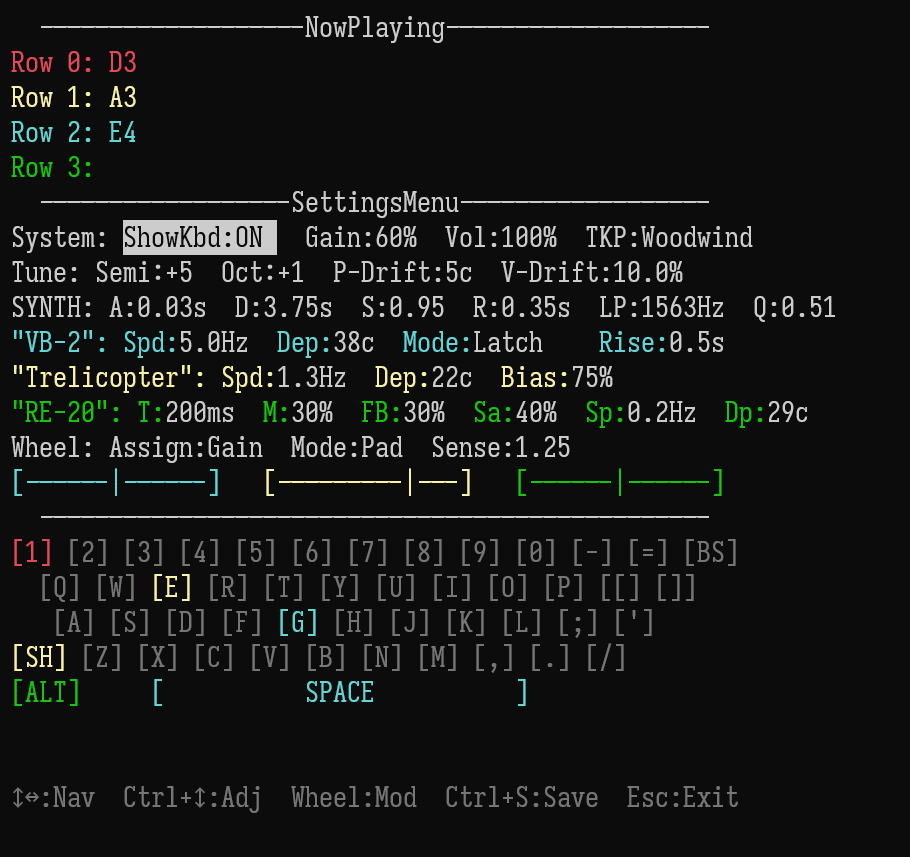
🎛️ Terminal User Interface (TUI) & Settings Menu

e30b6a7d87297c2ab7feb8dfcf5aa873.png

>span class="md-pair-s">SettingsMenu using your keyboard's arrow keys:

  • Left/Right: Switch between different parameters.
  • Up/Down: Adjust values.;

Global Parameters:

  • Semitone / Octave: Transpose the entire keyboard.
  • ShowKbd: Toggle the visual representation of the keyboard at the bottom.
  • Master: Master volume output (0% to 200%).

ADSR Envelope:

  • A (Attack), D (Decay), S (Sustain), R (Release) Fine-tune the synthesizer's volume envelope shape.

🎸 Built-in Effects (Stompboxes)

TinyIsomorphicKeyboard includes three built-in effects, each with its own dynamic visualizer bar at the bottom of the screen.

  1. "VB-2" Vibrato (Pitch Modulation)
    • Toggle: Press SPACE to activate.
    • Mode: Switch between Latch (toggle on/off) and Unlatch (active only while holding SPACE).
    • Parameters: Spd (Speed in Hz), Dep (Depth in cents), Rise (Fade-in time).
  2. "Trelicopter" Tremolo (Volume Modulation)
    • Toggle: Press Left SHIFT to activate.
    • Parameters: Spd (Speed in Hz), Dep (Depth in %), Bias (Waveform shape offset).
  3. "RE-20" Tape Echo (Delay)
    • Toggle: Press Left ALT to activate.
    • Parameters: T (Time in ms), M (Mix %), FB (Feedback %), Sa (Tape Saturation %), Sp & Dp (Wow & Flutter LFO Speed/Depth).

⚙️ Configuration & Presets

>span class="md-pair-s">config.ini in the executable directory to load your favorite settings. Since the latest update, all synthesis parameters can be saved and loaded.

  • CTRL + S: Save current settings to config.ini (Instant Preset).

📝 The config.ini Format

You can manually edit the file to define your startup state. Here are the most common parameters:

Ini, TOML

# Note Mappings
row0_start=A1
row1_start=D2
row2_start=G2
row3_start=C3
# ADSR Envelope
attack=0.01
decay=0.25
sustain=0.8
release=0.1
# Effects Control
vb2_speed=1.3
vb2_depth=16
trem_speed=3.0
re20_time=400
re20_feedback=40
etc.

🚀 Command Line Usage

For power users, you can bypass the default config or override specific rows:

  • Load specific preset: isomorphic_keyboard.exe --config chill_lofi.ini
  • Quick note override: isomorphic_keyboard.exe row0=D5

License

This project is licensed under the MIT License.

Leave a comment

Log in with itch.io to leave a comment.